Chapter 5: AI and Contemporary Technologies
Learn how AI, robots, connected devices and online services work. Study simple definitions, everyday examples, comparisons and practice questions.
1 Introduction to AI
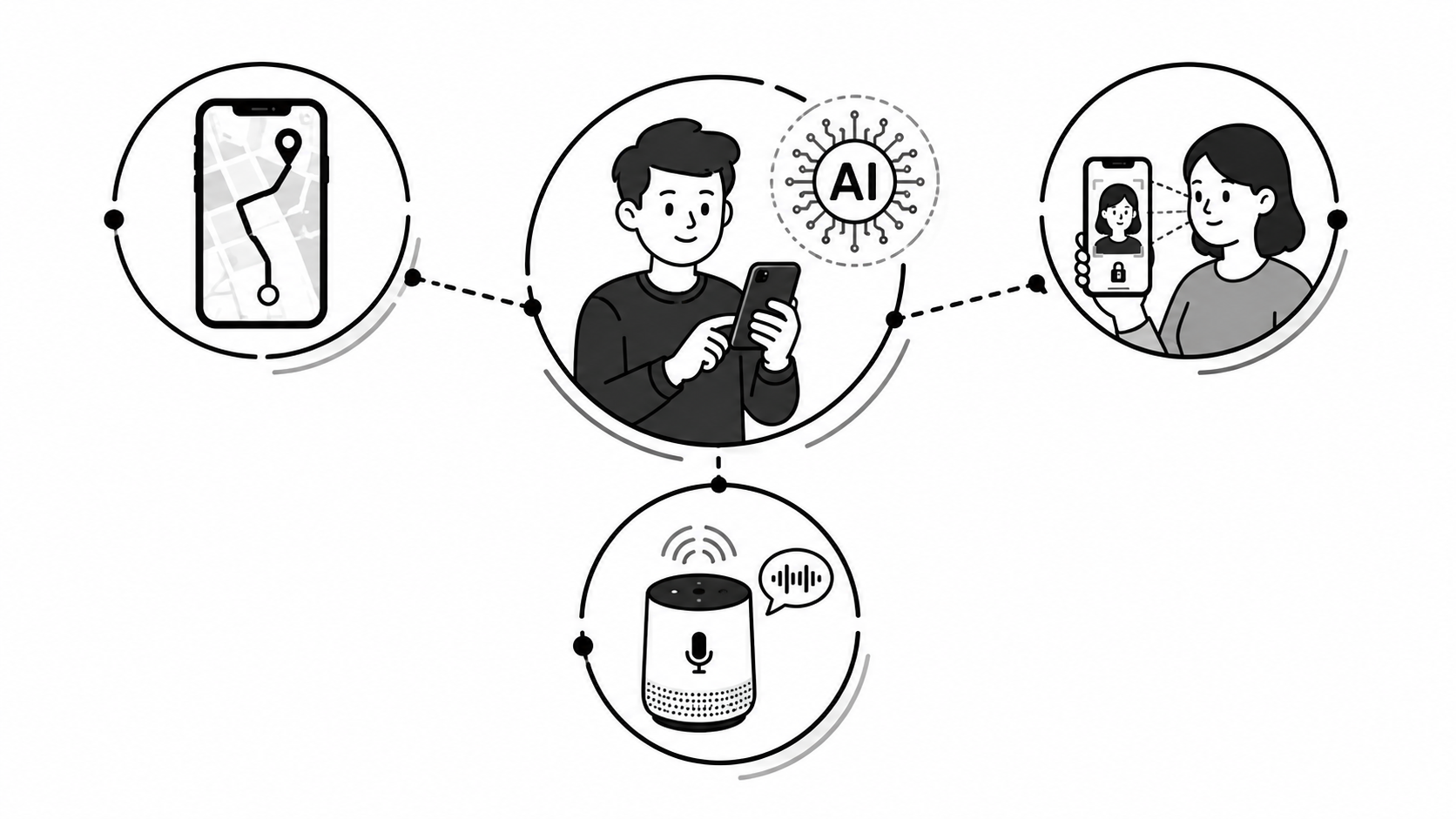
When YouTube suggests a video or your phone recognises your face, it may use Artificial Intelligence. AI helps computers recognise patterns and carry out useful tasks.
John McCarthy introduced the term "Artificial Intelligence" in a 1955 proposal for the Dartmouth workshop held in 1956. He is often called the Father of AI. The workshop was an important starting point for AI research.
Ordinary programs and AI programs
| Ordinary program | AI program |
|---|---|
| Follows fixed rules written by a programmer | Uses rules, learned patterns or both |
| A calculator follows set steps to calculate an answer | A trained AI model may need retraining to improve |
| Example: a calculator app | Example: Google Lens recognising a flower |
2 Goals of AI
Scientists build AI with these main goals:
Reasoning
Help machines think logically and solve problems step by step.
Learning
Let machines learn from data and past experience, and improve.
Understanding Language
Read, listen and reply in human languages like Nepali and English.
Perception
See and recognise images, faces, objects and sounds.
Problem Solving
Compare possible choices and find a useful solution.
Helping Humans
Do difficult, boring, repetitive or dangerous work for us.
3 Branches of AI
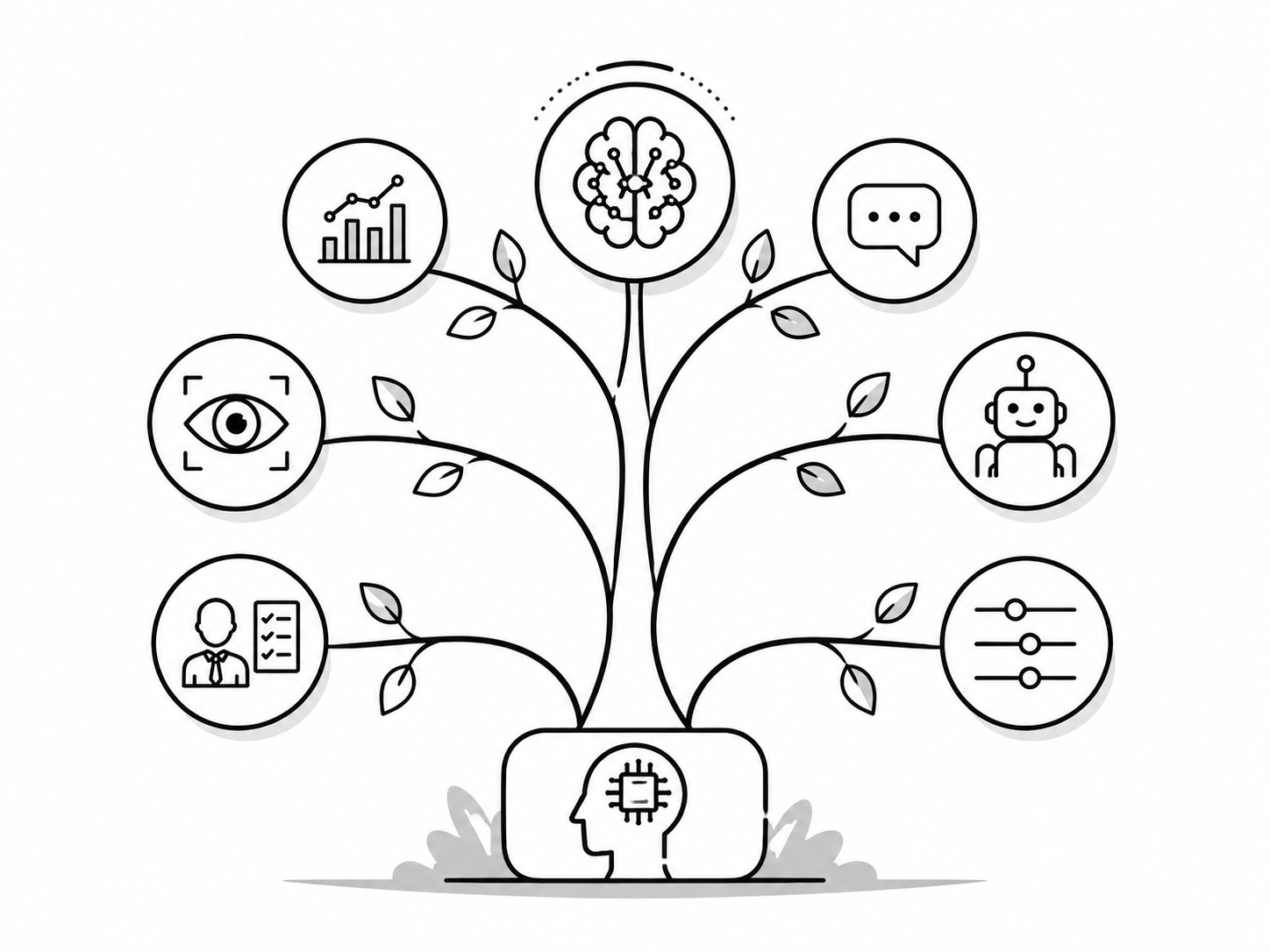
AI includes several connected areas. These areas often work together in one application.
Machine Learning
Computers learn patterns from training data. Example: an email spam filter.
Neural Network & Deep Learning
Neural networks use connected processing units. Deep learning uses networks with many layers. Example: face recognition.
Natural Language Processing (NLP)
Understanding and generating human language. Example: Google Translate, chatbots.
Computer Vision
Understanding images and videos. Example: face unlock, number-plate reading.
Expert System
Software that uses stored expert knowledge and rules to give advice. Example: a fault-diagnosis system.
Robotics
Designing and controlling robots. AI can help robots recognise objects and plan actions, but not every robot uses AI.
Fuzzy Logic
Handles "in-between" answers, not just yes/no. Example: smart AC and washing machines.
4 Applications / Use of AI
Here are some common uses of AI:
| Field | Use of AI | Real example |
|---|---|---|
| Healthcare | Helping trained health professionals analyse medical images and reports | AI cancer-screening tools |
| Education | Personalised learning and AI tutors | Duolingo, Khan Academy |
| Transport | Traffic prediction, route planning and driving assistance | Navigation and driver-assistance systems |
| Banking | Fraud detection and customer chatbots | An AI system that flags unusual transactions |
| Entertainment | Recommending what you may like next | YouTube, Netflix |
| Smartphones | Face unlock, voice typing, smart camera | Voice typing and face recognition |
| Agriculture | Detecting crop disease from a photo of a leaf | Plantix-type apps used by farmers |
| Business | Sales prediction and customer support | Website chatbots |
| Security | CCTV face recognition, cyber-attack detection | Airport security systems |
5 Advantages & Limitations of AI
| ✅ Advantages | ❌ Limitations |
|---|---|
| Can run for long periods when power and systems are available | Some AI systems are expensive to develop and maintain |
| Can complete suitable tasks quickly and reduce some errors | Can give wrong answers and lacks reliable human judgement |
| Does dangerous and boring jobs for us | Can replace some tasks and change the skills needed for jobs |
| Helps take better decisions using large data | Poor data or badly designed rules can produce wrong results |
| Can support users through apps and websites | Can be misused for deepfakes, cheating and scams |
| Can handle huge amounts of information at once | Needs suitable hardware, power and skilled support; some AI works offline |
6 Machine Learning
For example, we can train a model with photos labelled "cat" and "not cat". We then test whether it can recognise cats in photos it has not seen before.
7 Types of Machine Learning
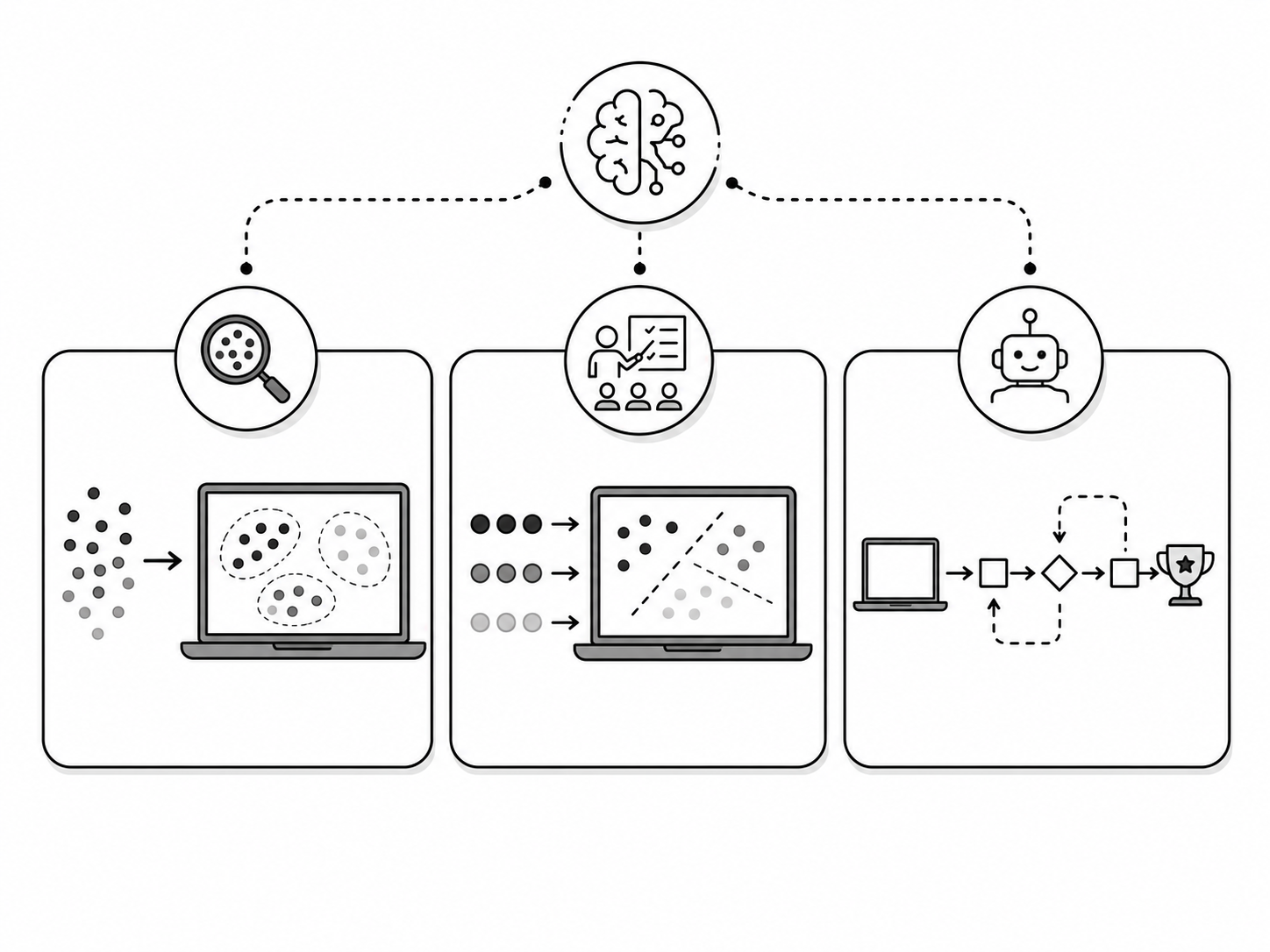
Three common types of machine learning are:
1. Supervised Learning
Learns from labelled data, where the correct answers are already given. This is similar to practising with worked examples.
2. Unsupervised Learning
Finds groups or patterns in unlabelled data. The examples do not include the answers the model should produce.
3. Reinforcement Learning
Learns by trial and error. A reward score gives feedback on its actions, and the system learns to increase its total reward.
| Type | Data used | How it learns | Real-life example |
|---|---|---|---|
| Supervised | Labelled (answers given) | Compares its answer with the correct answer | Email spam filter, house-price prediction |
| Unsupervised | Unlabelled (no answers) | Groups similar things together | Grouping customers by shopping habits |
| Reinforcement | Experience and feedback from actions | Learns actions that increase total reward | A game-playing AI learning to earn a higher score |
8 How Machine Learning Works
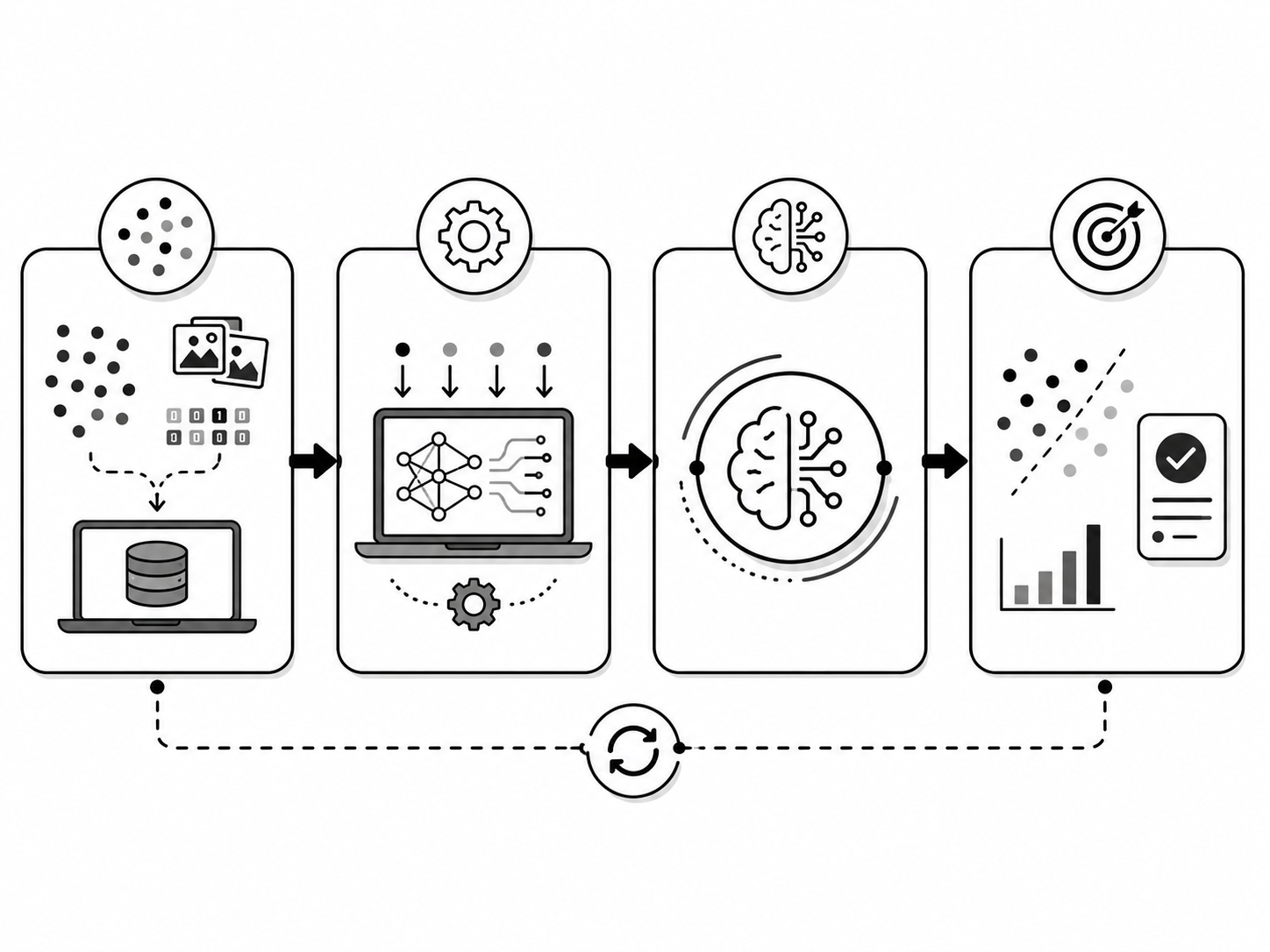
Machine learning follows five simple steps:
Collect Data
Gather many examples: photos, numbers, text or sound.
Prepare Data
Fix errors, handle missing values and separate training data from test data.
Train the Model
Use a learning algorithm to find patterns in the training data.
Test the Model
Check performance using test data that was not used for training.
Predict & Improve
Use the model for predictions. Review errors and retrain it when needed.
9 Applications of Machine Learning
Machine learning is used in many everyday products:
| Application | What it does |
|---|---|
| Spam Detection | Moves junk emails into the Spam folder |
| Speech Recognition | Converts your voice into text (Google voice typing) |
| Self-Driving Cars | Helps automated driving systems recognise lanes, vehicles and obstacles |
| Language Translation | Google Translate between Nepali and English |
| Chatbots | Automatic replies in customer support |
| Virtual Assistants | Siri, Alexa, Google Assistant |
| Fraud Detection | Flags unusual transactions for review or further checks |
| Social Media Feeds | Facebook and TikTok decide which post you see next |
| Healthcare Diagnosis | Helping doctors identify signs of disease in medical images |
| Personalised Learning | Apps that adjust to each student's level |
| Predictive Maintenance | Predicting when a machine will break down |
| Recommendation System | Daraz and Netflix "you may also like" |
| Cybersecurity | Detecting viruses, hacking and phishing attacks |
| Weather Forecasting | Supporting forecasts using past and current weather data |
10 AI vs Machine Learning vs Deep Learning
Students often mix these three up. They are not the same thing: one sits inside the other, like boxes inside boxes.
| Artificial Intelligence (AI) | Machine Learning (ML) |
|---|---|
| The whole field of making smart machines | A part (subset) of AI |
| Aim is to perform tasks that usually need human intelligence | Aim is to learn from data |
| May or may not learn from data | Always learns from data |
| Example: an expert system, a rule-based chess program | Example: spam filter, recommendation system |
Deep Learning is a special type of machine learning that uses artificial neural networks with many layers. Training large deep learning models often needs a lot of data and computing power. These models are useful for tasks such as image and speech recognition.
11 Robotics
Characteristics of a robot
- Sensing: it collects information using sensors and cameras.
- Movement: it can move its body, arms or wheels.
- Energy: it runs on a power source such as a battery.
- Control: a program controls its actions. Some robots use AI to adapt to changes.
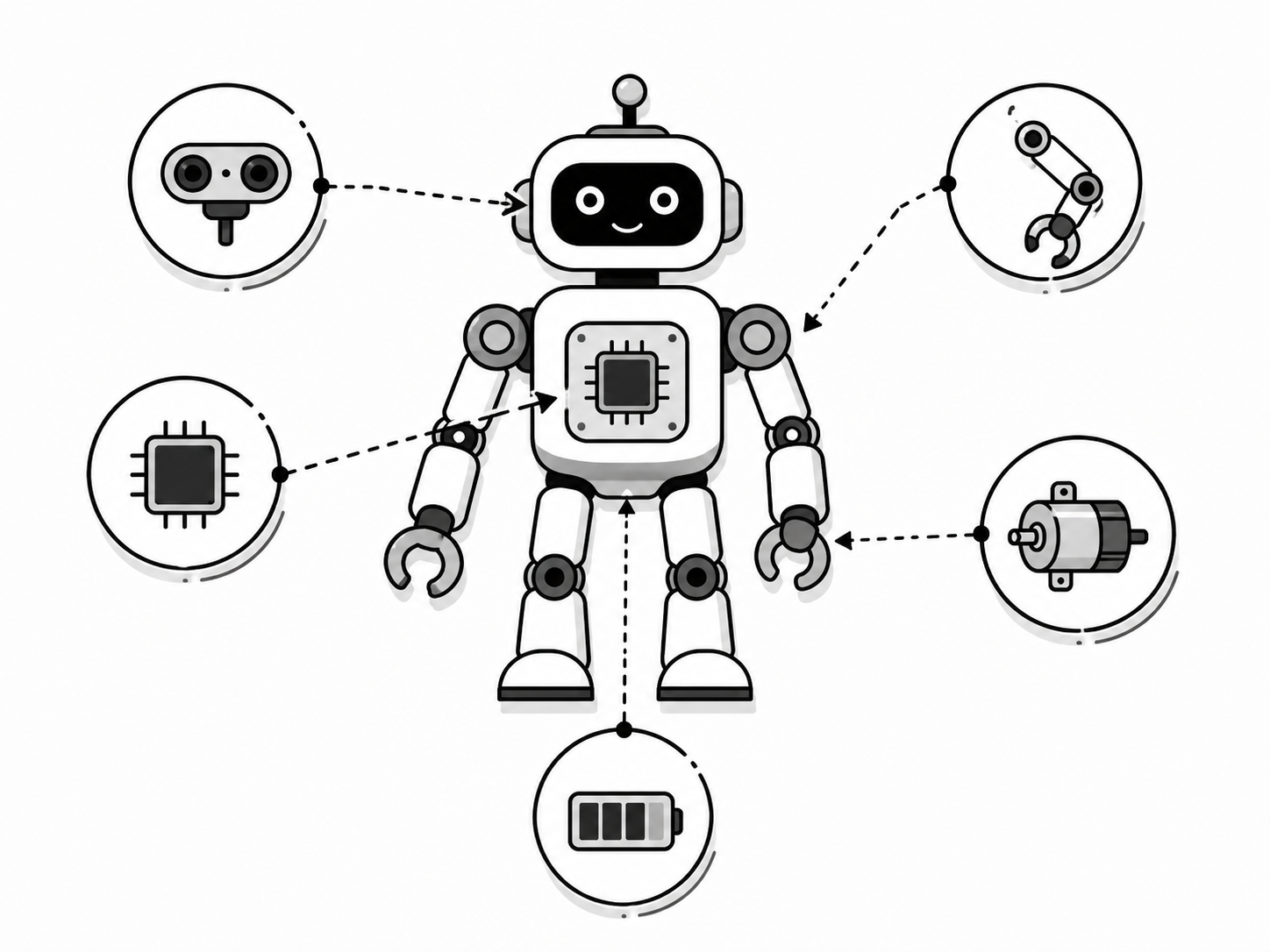
12 Parts of a Robot
Common robot parts are listed below. The parts needed depend on the task; for example, a robot vacuum does not need an arm.
Sensors
The robot's "senses": cameras, touch, distance, temperature and sound sensors.
Controller (Brain)
A small computer that runs the program and takes decisions.
Actuators & Motors
Parts that create movement: they turn decisions into action.
Manipulator (Arm)
An arm or gripper for holding and moving objects, if the robot needs one.
Power Supply
Battery or electricity that keeps the robot running.
Program / Software
The instructions that tell the robot what to do.
13 Uses, Advantages & Limitations of Robots
Where robots are used
| Field | Use of robots |
|---|---|
| Industry | Welding, painting and assembling cars |
| Medicine | Robot-assisted surgery and hospital delivery robots |
| Agriculture | Planting, spraying and harvesting crops, drones |
| Space & Defence | Mars rovers, bomb-disposal robots |
| Homes and restaurants | Robot vacuum cleaners and robots that carry food |
| Disaster rescue | Searching in earthquake rubble where humans cannot go |
| ✅ Advantages | ❌ Limitations |
|---|---|
| Repeat tasks for long periods, with charging and maintenance breaks | Very costly to buy and repair |
| Repeat suitable tasks with consistent precision | May struggle with unexpected situations outside their design |
| Can work in dangerous places (fire, mines, space) | Can replace some tasks and require workers to learn new skills |
| Increase production speed | Need electricity, maintenance and trained operators |
14 Simulating Robotics Tasks with Scratch
Scratch (scratch.mit.edu) is a free, block-based programming tool first developed at the MIT Media Lab. We can use it to simulate simple robot actions. A sprite is an on-screen character that can move and respond to instructions.
Example task: make a robot sprite move and avoid the edge
Procedure:
- Open scratch.mit.edu and click Create.
- Choose any sprite, or draw a robot using the Paint option.
- From the Events blocks, drag
when green flag clicked. - From Control, add a
foreverloop under it. - Inside the loop, put
move 10 stepsfrom Motion. - Still inside the loop, add
if on edge, bounceso the sprite changes direction when it touches the stage edge. - Click the green flag: the sprite moves and bounces when it touches an edge.
when right arrow key pressed block with Motion point in direction 90, and a left-arrow event with direction -90. To detect an obstacle, place Sensing touching color ? inside a Control if then block. Add a turn or stop instruction inside it.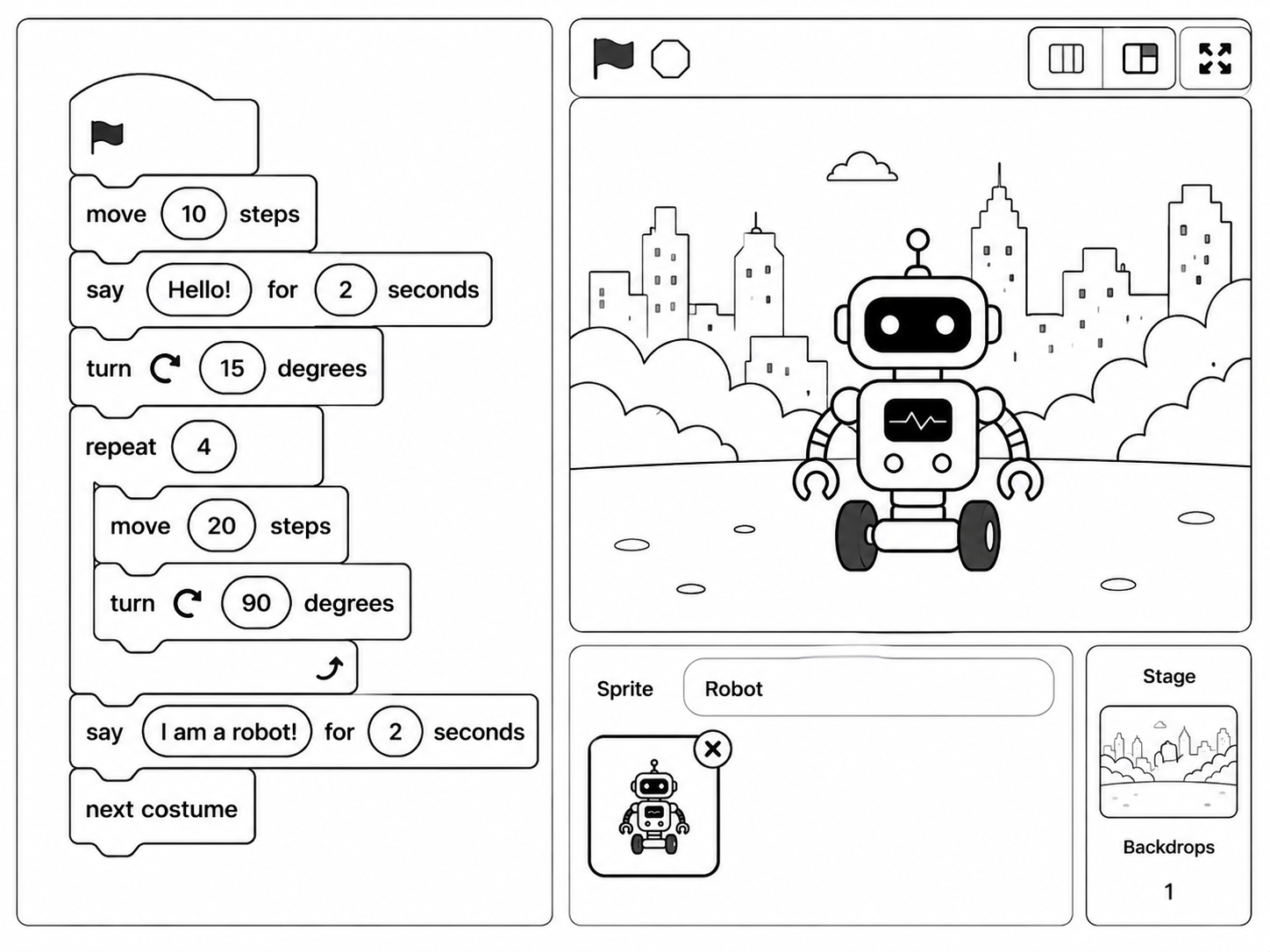
15 Generative AI
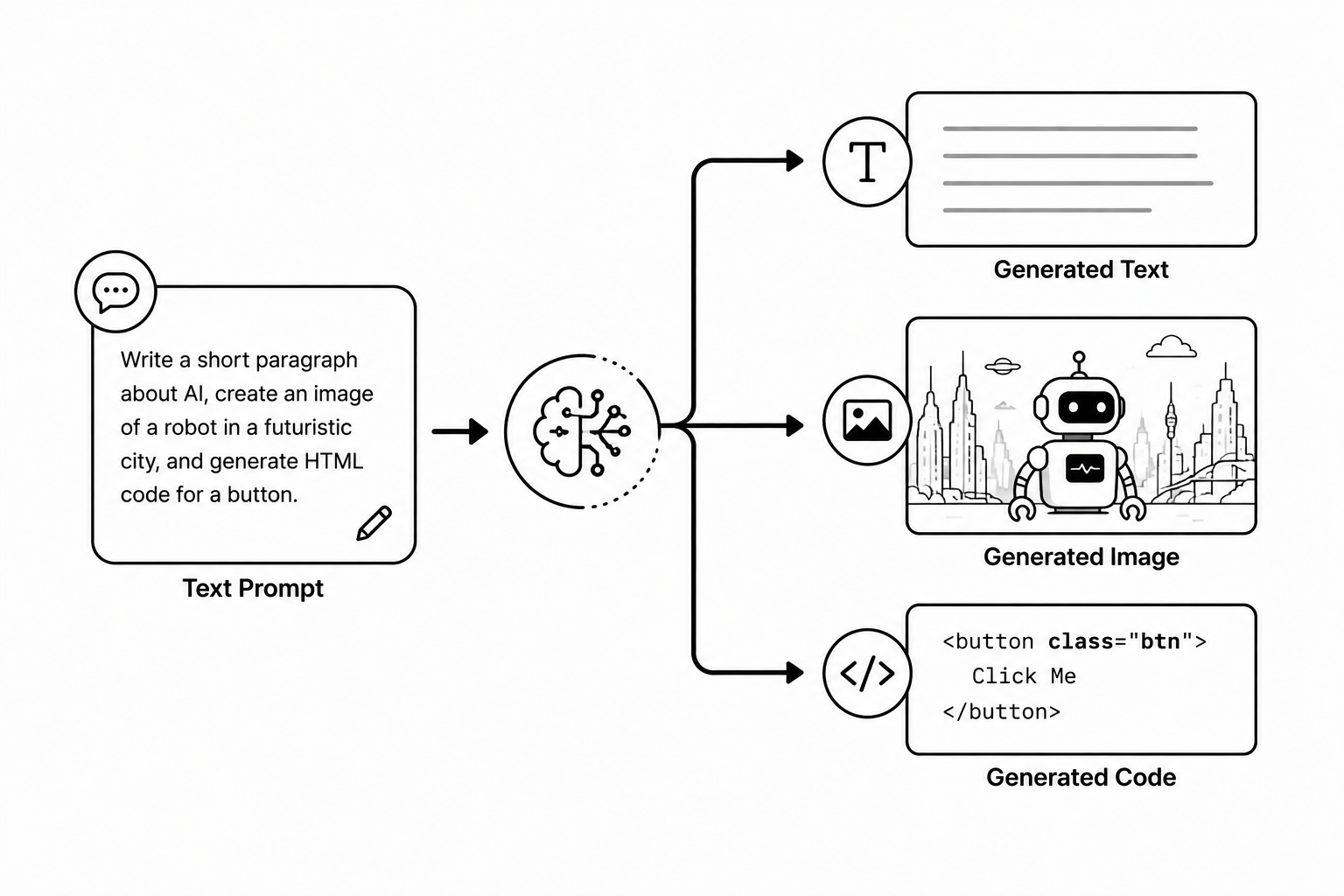
Uses of Generative AI
- Writing essays, emails, stories, poems and computer code.
- Creating images, posters and art from a text description.
- Summarising long documents into short notes.
- Answering questions and tutoring students.
- Translating and improving writing.
- Making presentations, quizzes and lesson plans for teachers.
16 Popular Generative AI Tools
ChatGPT
Made by OpenAI. A popular AI chatbot for text, answers, images and code.
Claude
Made by Anthropic. An AI assistant for writing, analysis and coding.
Gemini
Made by Google. An AI assistant for questions, writing and other tasks. Some Google apps also include Gemini features.
Microsoft Copilot
Made by Microsoft. An AI assistant. Microsoft also offers Copilot features in supported work apps.
DeepSeek
An AI assistant and family of models from DeepSeek, used for tasks such as answering questions and coding.
Midjourney / DALL·E
Tools that create pictures and artwork from a text description.
| Tool | Company | Mainly used for |
|---|---|---|
| ChatGPT | OpenAI | Text, answers, code, images |
| Claude | Anthropic | Writing, long documents, coding |
| Gemini | Questions, writing and supported Google app features | |
| Copilot | Microsoft | Questions, writing and supported Microsoft app features |
| DALL·E / Midjourney | OpenAI / Midjourney | Image generation |
17 Writing a Good Prompt
A clear prompt helps AI give a more useful response. Even a clear prompt can produce an incorrect answer, so check the result.
| ❌ Weak prompt | ✅ Good prompt |
|---|---|
| "Write about AI." | "Write a 100-word paragraph on Artificial Intelligence for a Class 10 student in simple English, with two Nepali examples." |
| "Nepal essay." | "Write a 150-word essay on tourism in Nepal with an introduction, three points and a conclusion." |
Four rules for a good prompt
- Be clear: say exactly what you want.
- Give context: who is it for, and why.
- Set the format: length, points, table, paragraph.
- Give an example: show the style you expect.
18 Integrated AI Tools
| App | AI feature inside it |
|---|---|
| Google Docs | Helps write, fixes grammar and summarises text |
| Gmail | Smart Reply, sentence auto-complete, spam filtering |
| Google Search | AI-written answer summary at the top of results |
| Canva | AI image generation, Magic Write, background remover |
| MS Office | Copilot writes documents and analyses Excel data |
| Google Photos | Face grouping, search by object, Magic Eraser |
| Smartphone camera | Scene detection, night mode, portrait blur |
| Facebook / TikTok | Decides which posts and videos appear in your feed |
19 Ethics in AI
Main ethical concerns:
- Bias: unfair data or design choices can lead to unfair results. Example: a hiring AI that rejects women because it learned from old records.
- Honesty and fake content: deepfake videos and AI-written fake news can mislead people.
- Jobs: AI may replace human workers in some fields.
- Responsibility: if a self-driving car causes an accident, who is to blame: the owner, the company or the programmer?
- Transparency: people should be told when they are talking to an AI, not a human.
- Academic honesty: students should use AI to learn, not to copy.
20 Privacy in AI
AI tools may process information you provide, such as messages, photos or voice recordings. What they collect and store depends on the tool and its settings. Misuse or leaks can expose private information.
How to protect your privacy
- Do not share passwords, citizenship numbers, bank details or private photos with a general-purpose AI chatbot.
- Read app permissions carefully before tapping "Allow".
- Turn off location and microphone access for apps that do not need them.
- Use strong passwords and two-step verification.
- Think before posting: anything online can stay forever (your digital footprint).
21 Security in AI
Security means protecting AI systems, and the data inside them, from hackers, viruses and misuse. AI can both strengthen security and threaten it.
| ✅ AI helps security | ❌ AI threatens security |
|---|---|
| Detects viruses and cyber-attacks very fast | Creates realistic fake voices and deepfake videos |
| Spots fraud in banking transactions | Writes convincing phishing messages automatically |
| Monitors networks 24 hours a day | Can guess weak passwords quickly |
| Blocks spam and harmful websites | Can spread misinformation at large scale |
22 Internet of Things (IoT)
The term "Internet of Things" was first used by Kevin Ashton in 1999.
23 How IoT Works
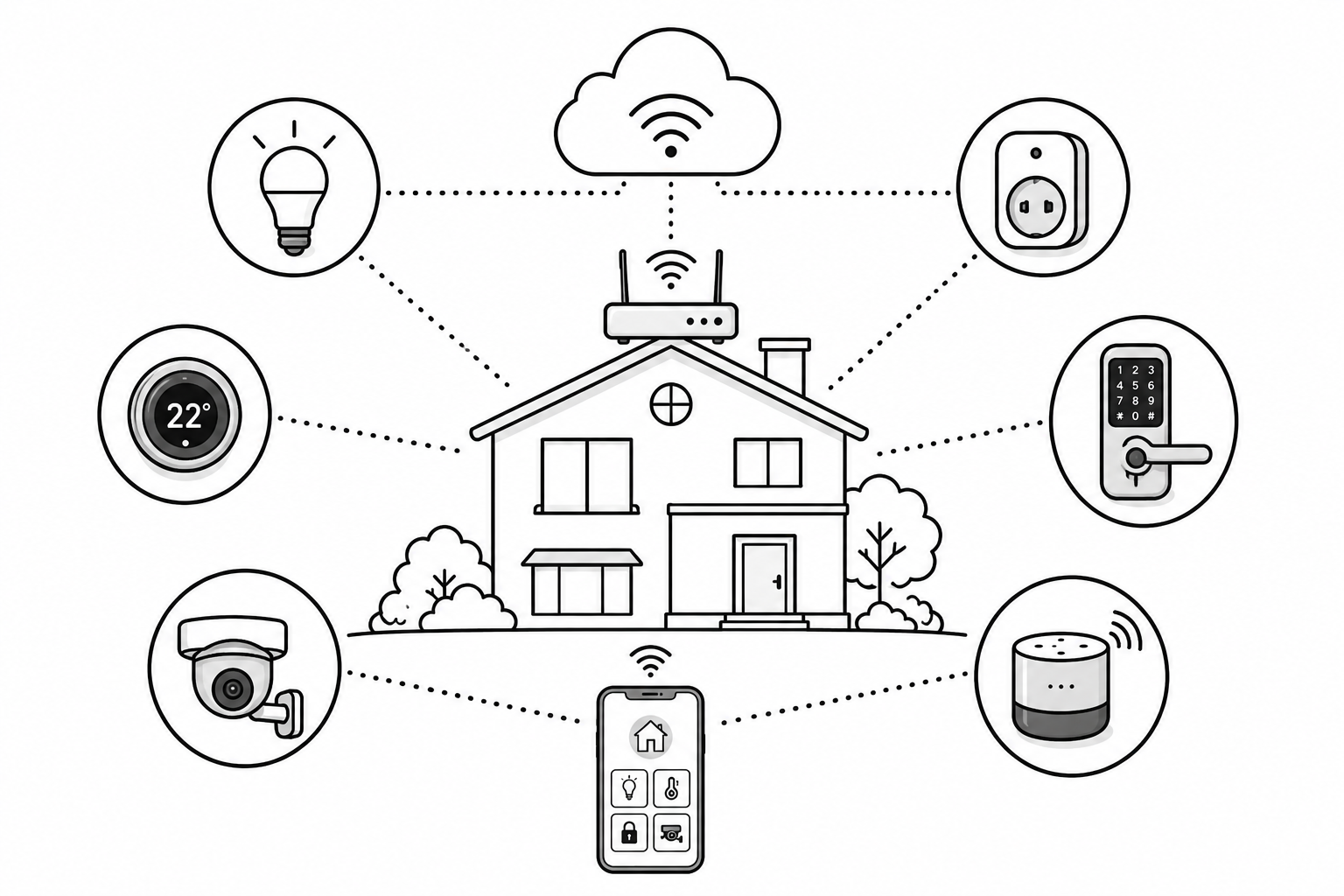
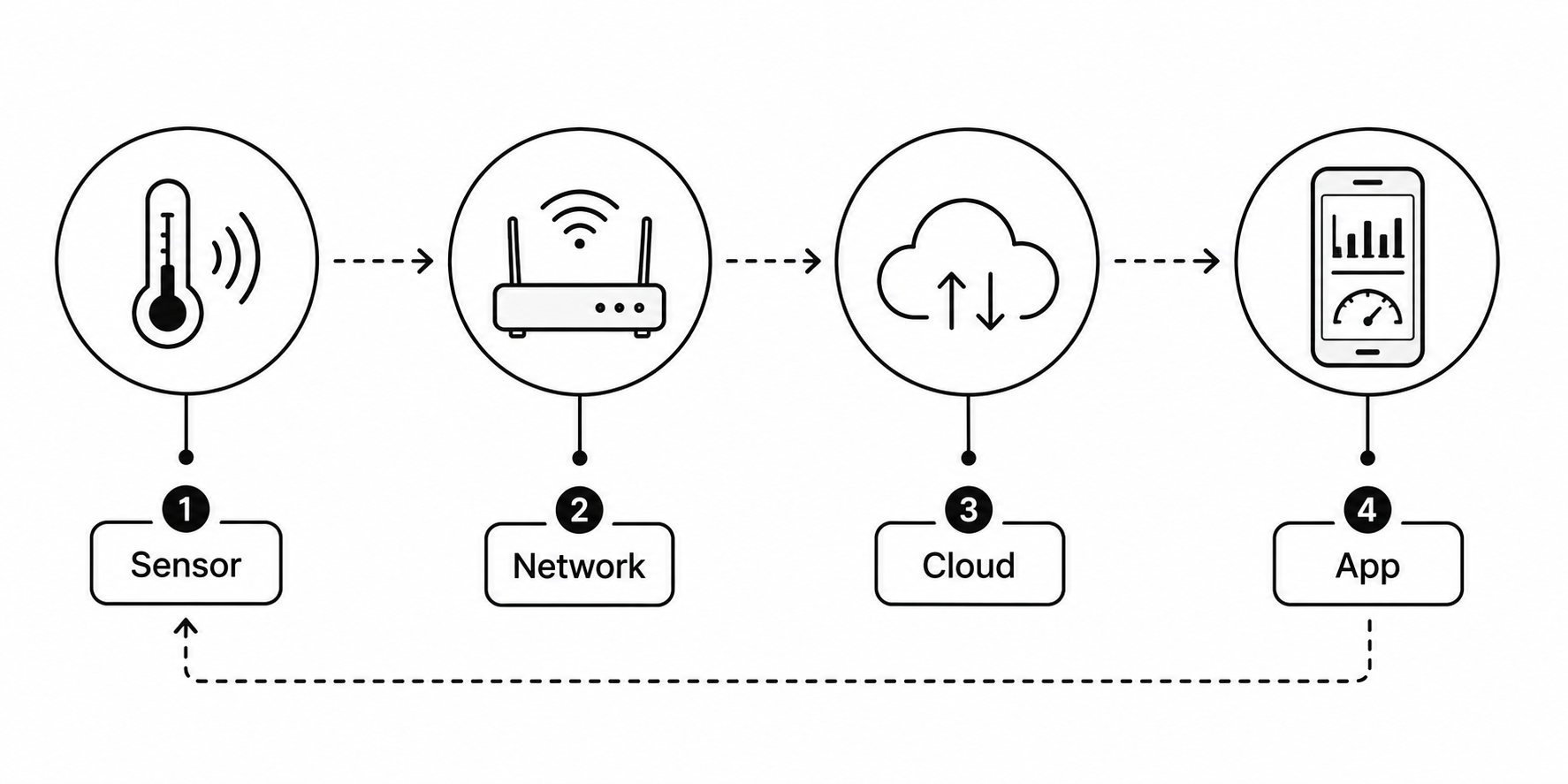
A simple IoT system can be explained using four main parts:
1. Sensors / Devices
Collect data from the real world: temperature, motion, light, heartbeat.
2. Connectivity
Connect devices using Wi-Fi, Bluetooth or mobile networks. A phone or hub may provide internet access.
3. Data Processing
A device, local computer or cloud server processes data and decides what action to take.
4. User Interface
You see the result on an app and can give a command back to the device.
24 Advantages of IoT
Remote Control
Control supported devices remotely when the required connections are available.
Saves Time
Automates daily tasks like lights, watering and alarms.
Saves Energy
Smart devices switch themselves off when not needed.
Useful Data
Collects real-time data that helps in better decisions.
Better Safety
Smart cameras, smoke alarms and door locks improve security.
Lower Cost
Less waste of electricity, water and manpower.
25 Limitations of IoT
- Security risk: connected devices can be hacked and misused.
- Privacy risk: some devices collect sensitive data, such as location or camera footage.
- Cost: buying, installing and maintaining connected devices can be costly.
- Internet dependent: remote access and online features may stop during an outage, although local functions may continue.
- Complexity: managing many devices of different brands is difficult.
- Power dependent: a power cut or empty battery can stop a device unless it has backup power.
26 Applications of IoT
| Area | IoT application |
|---|---|
| Smart Home | Smart lights, fans, CCTV, door locks, smart TV |
| Health | Smartwatches, fitness bands, patient monitors |
| Agriculture | Soil moisture and weather sensors for smart farming |
| Transport | GPS vehicle tracking, smart traffic lights |
| Industry | Machine sensors, automatic production lines |
| Smart City | Smart parking, street lights, waste management |
| Environment | Air-quality monitoring, flood and landslide warning |
| Retail | Smart shelves and automatic stock counting |
27 Virtual Reality (VR)
What a VR system needs
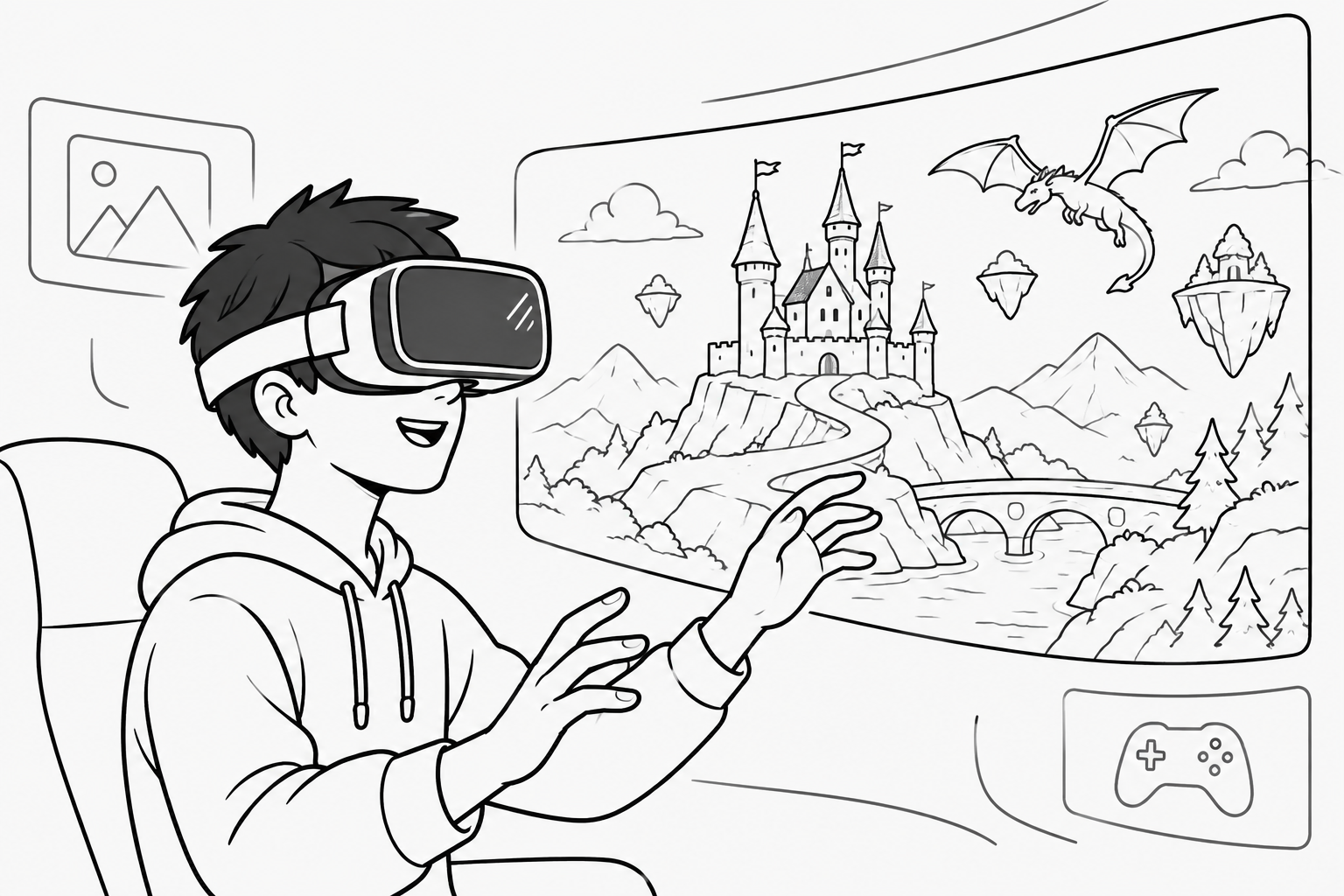
- Headset (HMD): shows a slightly different image to each eye to create a sense of depth. HMD means head-mounted display.
- Sensors / trackers: follow your head and hand movements.
- Controllers or gloves: let you touch and pick up virtual objects.
- Processing hardware: creates the virtual scene. It may be built into the headset or provided by a connected computer or phone.
28 Advantages & Limitations of VR
| ✅ Advantages | ❌ Limitations |
|---|---|
| Safe practice and training (pilots, doctors, drivers) | Headsets and computers are expensive |
| Makes learning interesting and easy to remember | Can cause dizziness, headache and eye strain |
| Virtual tours of places you cannot visit | Long use cuts a person off from real life |
| Simulate dangerous experiments with less physical risk | Needs suitable hardware; online experiences also need internet |
| Fun and highly immersive gaming | Suitable learning content and repair services may be hard to find |
29 Augmented Reality (AR)
Examples: Instagram and Snapchat face filters, Pokémon GO, Google Maps Live View arrows on the street, and apps that let you place a virtual sofa in your own room before buying it.
30 Extended Reality (XR) & Types
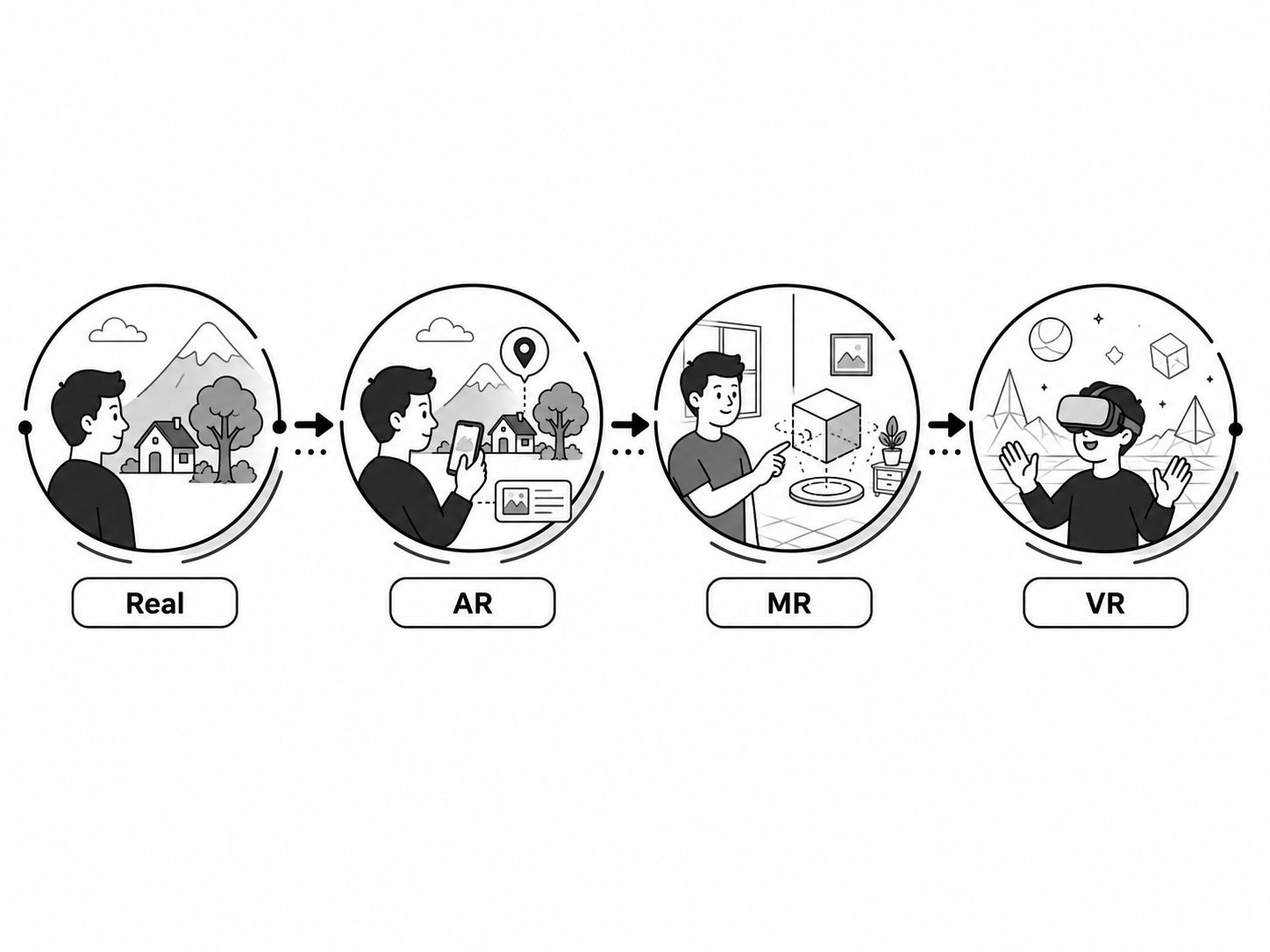
VR: Virtual Reality
An immersive digital environment that fills the user's view.
AR: Augmented Reality
Digital objects are added on top of the real world.
MR: Mixed Reality
Digital objects are placed in the real environment and respond to its surfaces or the user's actions.
| Point | VR | AR | MR |
|---|---|---|---|
| Real world visible? | No | Yes | Yes |
| How digital content is shown | Surrounds the user in a virtual scene | Adds content to a real-world view | Places content that responds to the real environment |
| Device needed | VR headset | Phone or AR glasses | MR headset |
| Example | VR games, VR flight training | Pokémon GO, Instagram filters | A virtual model anchored to a real desk |
31 Applications of XR
| Field | XR application |
|---|---|
| Education | Virtual science labs and 3D models of the human body |
| Gaming | Immersive VR and AR games |
| Medicine | Surgery training, phobia and pain therapy |
| Shopping | Trying clothes, spectacles or furniture virtually |
| Tourism | Virtual visits to heritage sites and mountain landscapes |
| Engineering | Walking through a 3D building design before construction |
| Military | Safe combat and flight training simulations |
| Real estate | Virtual house tours for buyers living abroad |
32 Cloud Computing
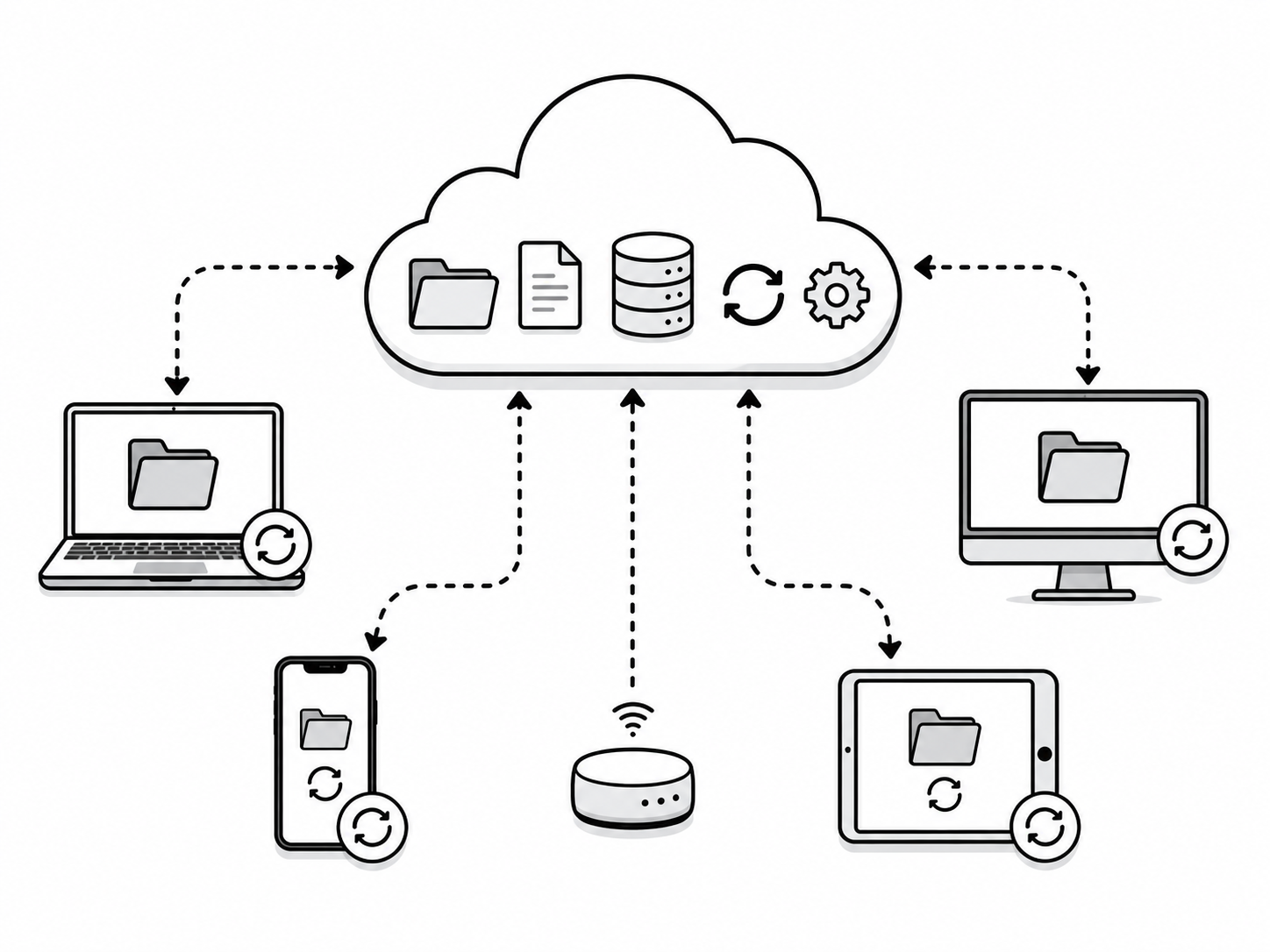
When you save photos to Google Drive, write in Google Docs or watch YouTube, remote servers handle storage or part of the processing. Your own device still displays the content and does some processing.
Main characteristics
- On-demand: take the service whenever you need it.
- Network access: use a compatible device and an available network connection.
- Scalable: increase or decrease storage and power easily.
- Measured use and resource sharing: the service tracks usage for each customer. Shared computing resources serve multiple customers with separate access controls.
33 Advantages & Limitations of Cloud Computing
Access Anywhere
Open online files on a compatible device with internet access and the right permissions.
Saves Money
No need to buy expensive servers and hardware.
Scalable
Get more storage or power the moment you need it.
Backup & Safety
Backup features can reduce data loss when enabled and checked. Important files still need a backup plan.
Collaboration
Many people can work on one file at the same time.
Auto Updates
Providers update hosted software. Apps installed on your device may still need updates.
Limitations
| Limitation | Why it matters |
|---|---|
| Needs the internet | Online features need a connection; downloaded or offline-enabled files may still work |
| Security and privacy | Your data is stored on someone else's server |
| Less control | You depend on the service provider's rules |
| Ongoing cost | Paid plans may charge by subscription or usage |
| Downtime | Provider outages can make some or all services unavailable |
34 Types of Cloud Computing
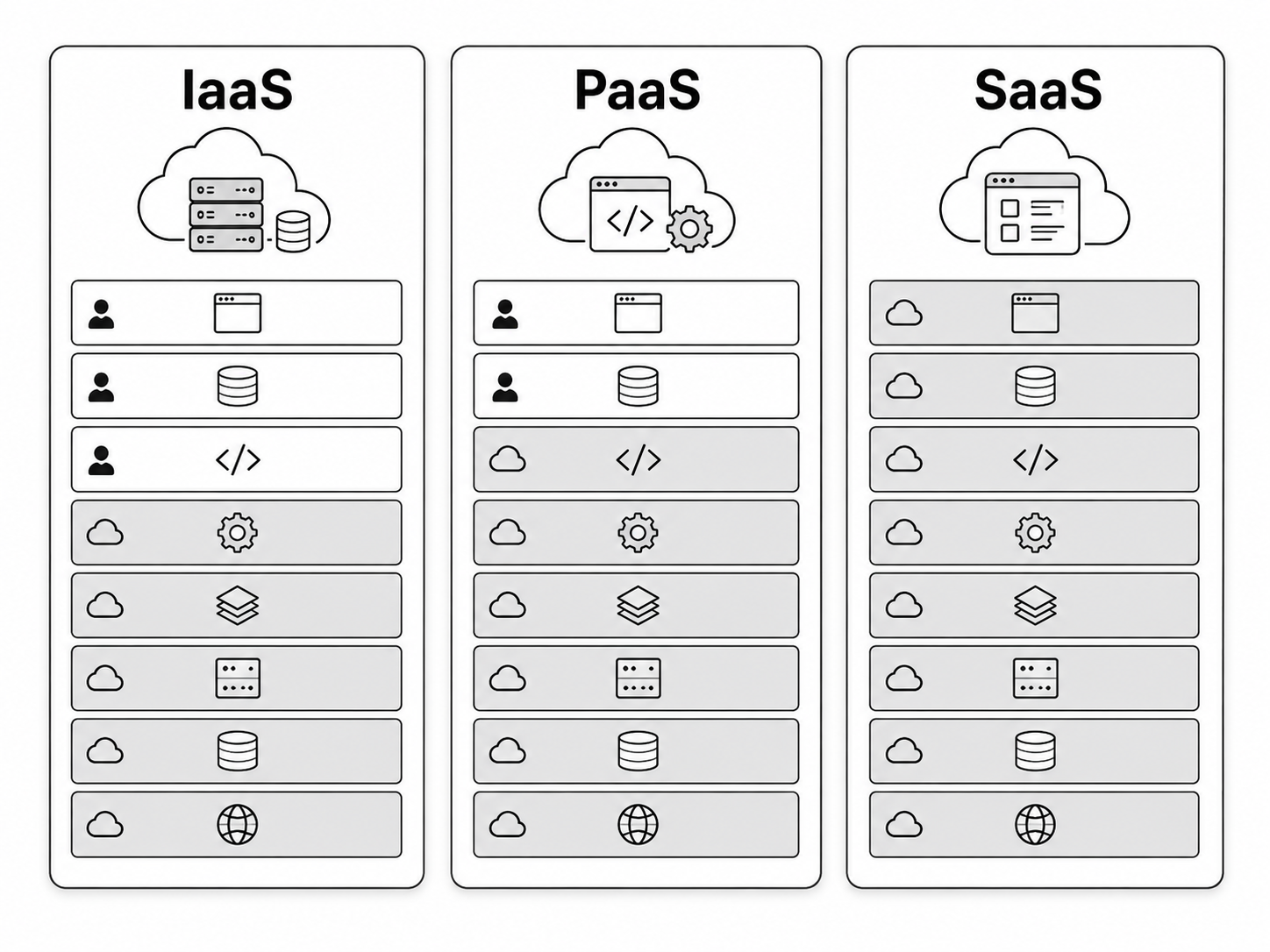
Cloud is classified in two ways: by who can use it (deployment) and by what it provides (service).
A. By deployment (who can use it)
| Type | Meaning | Example |
|---|---|---|
| Public Cloud | Services offered to many customers; each customer's data can remain private | Amazon Web Services (AWS), Microsoft Azure |
| Private Cloud | Cloud resources reserved for one organisation; security still depends on how they are managed | A bank's own internal cloud |
| Hybrid Cloud | Connected cloud environments, often public and private, that share data or workloads | Sensitive data private, website public |
| Community Cloud | Shared by several organisations with a common purpose | A cloud shared by government hospitals |
B. By service (what it provides)
| Service | Full form | What you get | Example |
|---|---|---|---|
| IaaS | Infrastructure as a Service | Servers, storage and network | Amazon EC2, Google Compute Engine |
| PaaS | Platform as a Service | A ready platform to build and run your own apps | Google App Engine, Heroku |
| SaaS | Software as a Service | Ready-made software accessed through a browser or app | Gmail, Google Docs, Canva |
35 Applications of Cloud Computing
| Application | Example |
|---|---|
| Data storage | Google Drive, Dropbox, OneDrive |
| Ready-made software (SaaS) | Gmail, Google Docs, Canva |
| Backup | Automatic photo and contact backup |
| Collaboration | Many students editing one document together |
| Streaming services | YouTube, Netflix, Spotify |
| Game streaming | Playing heavy games without a costly computer |
| Business software | Online billing, accounting and school software |
| Website hosting | Websites and apps running on cloud servers |
| AI services | ChatGPT and other AI tools run on cloud servers |
36 E-commerce
Features of e-commerce
- Open 24 hours a day, 7 days a week.
- Can reach customers beyond the local area, depending on delivery and service coverage.
- Payment can be online (eSewa, Khalti, card) or cash on delivery.
- Products are shown with photos, description, price and reviews.
37 How E-commerce Works (Technology)
An e-commerce system is built from five main parts:
Website / App
The online shop where products are displayed.
Shopping Cart
Holds the items a customer has selected before paying.
Payment Gateway
Securely sends payment information for processing. Shops may offer wallets, bank payments or cards.
Database
Stores products, prices, stock, customers and orders.
Delivery / Logistics
Packs and delivers the product to the customer's address.
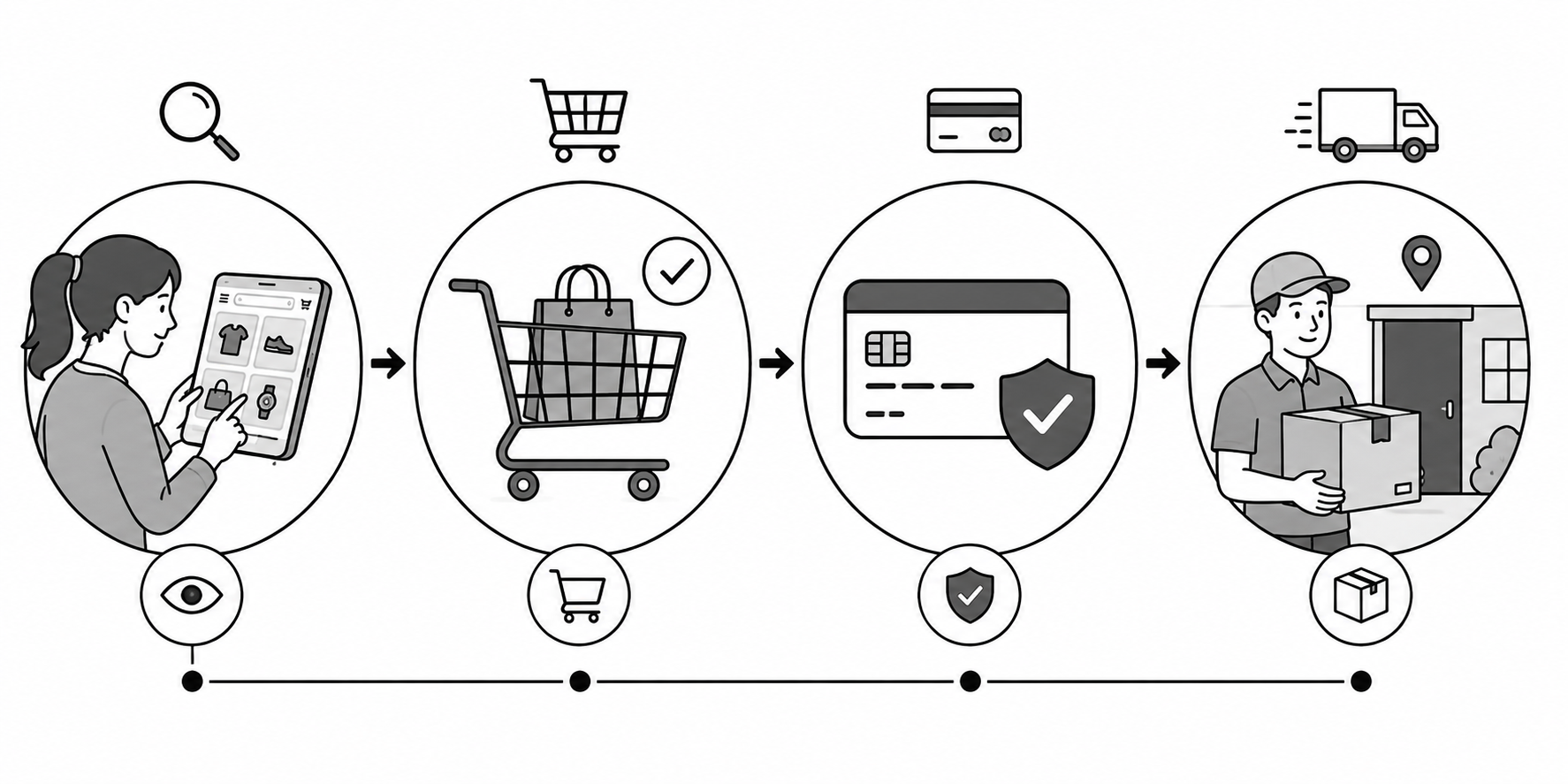
Steps of an online order
- Customer searches and selects a product.
- Product is added to the shopping cart.
- Customer enters the delivery address.
- Payment is made online, or cash on delivery is chosen.
- The seller receives and confirms the order.
- The product is packed and delivered, and the customer may leave a review.
38 Traditional Commerce vs E-commerce
| Traditional Commerce | E-commerce |
|---|---|
| Buying from a physical shop | Buying online from anywhere |
| Open only during shop hours | Open 24 hours, 7 days a week |
| Limited to the local area | Can reach customers worldwide |
| Payment may use cash, cards or QR codes | Online payment or cash on delivery |
| You can see and touch the product first | You see only photos and descriptions |
| In-stock goods can often be taken home immediately | Physical goods usually need delivery; digital goods may arrive instantly |
| Costs may include shop rent, stock and staff | May save shop rent, but still has website, marketing and delivery costs |
| Face-to-face relationship with the seller | Contact through chat, email or phone |
39 Benefits & Limitations of E-commerce
| ✅ Benefits | ❌ Limitations |
|---|---|
| Shop from home at any time | You cannot touch or try the product first |
| More choice and easy price comparison | Risk of online fraud and fake products |
| Sellers reach customers worldwide | Needs internet and digital literacy |
| May reduce the need for a physical shop | Delivery delays and difficult returns |
| Easy and fast digital payment | Privacy and data-security concerns |
| Saves travel time and cost | Weak delivery service in remote villages |
40 Types of E-commerce
| Type | Full form | Meaning | Example |
|---|---|---|---|
| B2C | Business to Consumer | A business sells directly to a customer | A business selling you a phone through Daraz |
| B2B | Business to Business | One business sells to another business | A wholesaler supplying a shop through an online order |
| C2C | Consumer to Consumer | One person sells to another person | Selling a used bike on Hamrobazar |
| C2B | Consumer to Business | A person sells a service to a company | An individual offering logo design to a company online |
| B2G | Business to Government | A business supplies goods to government | A company bidding on an e-bidding portal |
| G2C | Government to Citizen | Online government services, usually studied under e-governance | Paying tax or licence fees online |
41 E-commerce and E-payment in Nepal
People in Nepal use websites and apps to order goods and services. E-payment means paying electronically, such as through a wallet, bank app or card.
Popular e-commerce platforms
| Platform | What it offers |
|---|---|
| Daraz | Online marketplace for electronics, clothing and other goods |
| Retailer websites | Online orders from individual shops and brands |
| Food-ordering apps | Online food ordering and delivery |
| Hamrobazar | Buying and selling used items between people (C2C) |
| Grocery and gift websites | Groceries and general shopping |
Digital payment (e-payment) in Nepal
| Service | Type | Used for |
|---|---|---|
| eSewa, Khalti by IME | Digital wallet | Recharge, bills, online shopping |
| connectIPS | Bank transfer system | Sending money between bank accounts |
| Fonepay QR | QR payment | Paying at shops by scanning a code |
| Debit / Credit card | Card payment | Online and in-shop payment |
42 E-Governance and its Types
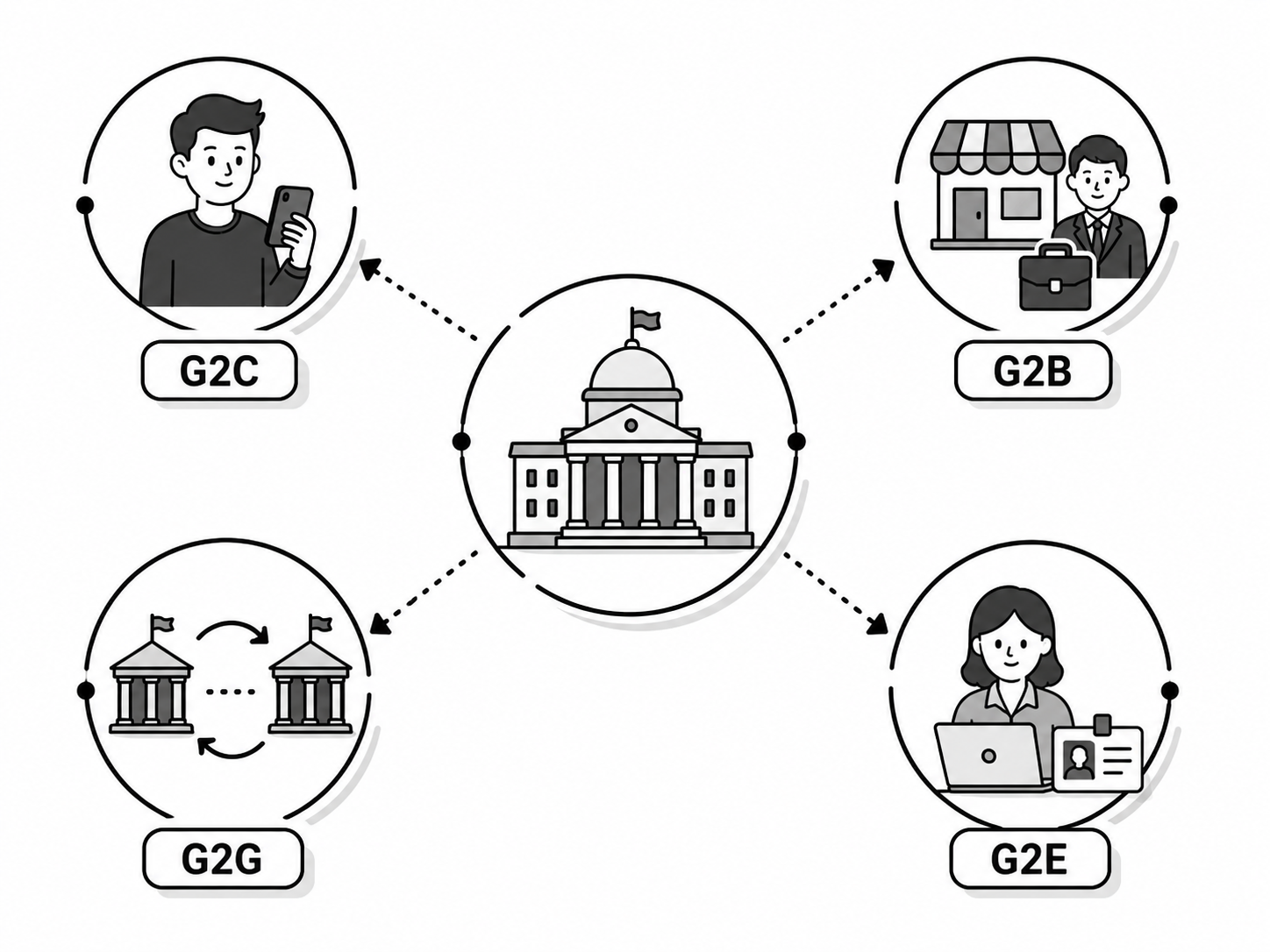
Types of e-governance
| Type | Meaning | Example |
|---|---|---|
| G2C: Government to Citizen | Services given to ordinary people | Online passport form, SEE results |
| G2B: Government to Business | Services given to companies | Online company registration, e-bidding |
| G2G: Government to Government | One government office serving another | Data sharing between ministries |
| G2E: Government to Employee | Services for government staff | Online salary, leave and pension records |
43 E-Governance in Nepal
Nepal has been moving many government services online to make them faster and more transparent.
Examples in Nepal
- Nagarik App: many government services in one mobile app.
- Passport pre-enrolment and PAN application services. Some steps require verification or a visit.
- Online driving licence applications and appointment information.
- Electronic payment of taxes, electricity and water bills.
- Online results and notices (SEE, NEB, Loksewa).
- Online company registration and public procurement portals.
| ✅ Advantages | ❌ Limitations |
|---|---|
| Can reduce office visits and waiting time | Needs internet access and digital skills |
| Makes records and procedures easier to track | Risk of hacking and data leaks |
| Many forms and information pages can be accessed outside office hours | Many rural areas still lack internet |
| Reduces paperwork and cost | Server downtime stops the service |
| Can improve access when services are inclusive and reliable | Older citizens may need help to use it |
44 E-Education
Students can learn through live classes, recorded videos, digital books and learning apps. E-education can support classroom teaching as well as learning from home.
| Tool | Use |
|---|---|
| Zoom / Google Meet / MS Teams | Live online classes |
| YouTube | Free video lessons in Nepali and English |
| Google Classroom / Moodle | Assignments, notes and quizzes |
| E-Pustakalaya | Free Nepali digital library |
| Khan Academy, Coursera | Lessons and courses; some courses or certificates require payment |
| ✅ Advantages | ❌ Limitations |
|---|---|
| Study saved lessons at a convenient time; live classes have fixed times | Needs a device and power; online activities also need internet |
| Cheaper and more flexible | Less face-to-face interaction with teachers |
| Recorded lessons can be watched again | Distraction, screen fatigue and eye strain |
| One teacher can reach thousands of students | Practical and lab work is difficult online |
45 E-Medicine and Telemedicine
This is very useful in Nepal, where many villages are far from a hospital. A health worker in a remote district can show reports to a specialist doctor in Kathmandu through a video call.
| Service | What it does |
|---|---|
| Online consultation | Video call with a doctor from home |
| E-prescription | Digital prescription sent to your phone |
| Online reports | Lab reports viewed on a website or app |
| Health apps | Track steps, heart rate, medicine reminders |
| Online appointment | Book a doctor's time without visiting |
| ✅ Advantages | ❌ Limitations |
|---|---|
| Health service reaches remote villages | Some examinations, tests and treatments require an in-person visit |
| Saves travel time and money | Needs good internet and devices |
| Can connect patients or local health workers with distant specialists | Patient data privacy is a concern |
📝 Exercises & Quiz
Test what you've learned! Click Show Answer to check yourself.
⚡ Quick Revision: One Line Each
| Term | One-line definition to memorise |
|---|---|
| Artificial Intelligence | The field of making computers perform tasks that usually need human intelligence. |
| Machine Learning | Part of AI in which machines learn from data without being programmed for every step. |
| Deep Learning | Machine learning that uses multi-layer artificial neural networks. |
| Generative AI | AI that creates new content such as text, images, audio and code. |
| Prompt | An instruction, question or other input that guides an AI response. |
| Robotics | Branch of technology that designs, builds and uses robots. |
| IoT | Network of everyday physical devices connected to the internet that share data. |
| Virtual Reality | A computer-created 3D environment that users can explore; immersive VR fills their view. |
| Augmented Reality | Digital objects added on top of the real world. |
| Extended Reality | Umbrella term covering VR, AR and MR. |
| Cloud Computing | Accessing shared storage, software or processing power over a network when needed. |
| E-commerce | Buying and selling of goods and services over the internet. |
| E-Governance | Delivering government services to citizens electronically using ICT. |
| E-Education | Teaching and learning through electronic and internet technologies. |
| E-Medicine | Using digital technology to support healthcare, including remote care. |
📚 Short Terms / Glossary
🔤 Full Forms (Click "Reveal" to check)
✅ Choose the Correct Answer (MCQ)
✍️ Short Answer Questions
🛠️ Practical Ideas (Try it yourself)
- Try a generative AI tool: ask ChatGPT or Gemini to explain photosynthesis to a Class 10 student, then check the answer against your textbook and note any mistake.
- Prompt practice: write one weak prompt and one good prompt for the same task, and compare the two answers you get.
- Build a Scratch robot that moves forward, bounces off the edges, and can be steered with the arrow keys.
- Spot the AI: list five AI features found in phones or apps and write which branch of AI each one belongs to.
- Cloud in action: upload a sample document to Google Drive, then open it on another device using your account.
- Collaborate: create one Google Doc and edit it with three friends at the same time. Note what happens.
- Explore e-governance: visit an official government website and list the online services you find. Note which steps still need an office visit.
- Compare prices: compare one product on Daraz and in a local shop. Include delivery charges and return conditions; you do not need to buy it.
- Design an IoT idea: draw a simple smart-home plan for your house showing which devices you would connect and why.
- Class debate: "AI will create more jobs than it destroys." Prepare three points for and three points against.